|
Getting your Trinity Audio player ready...
|
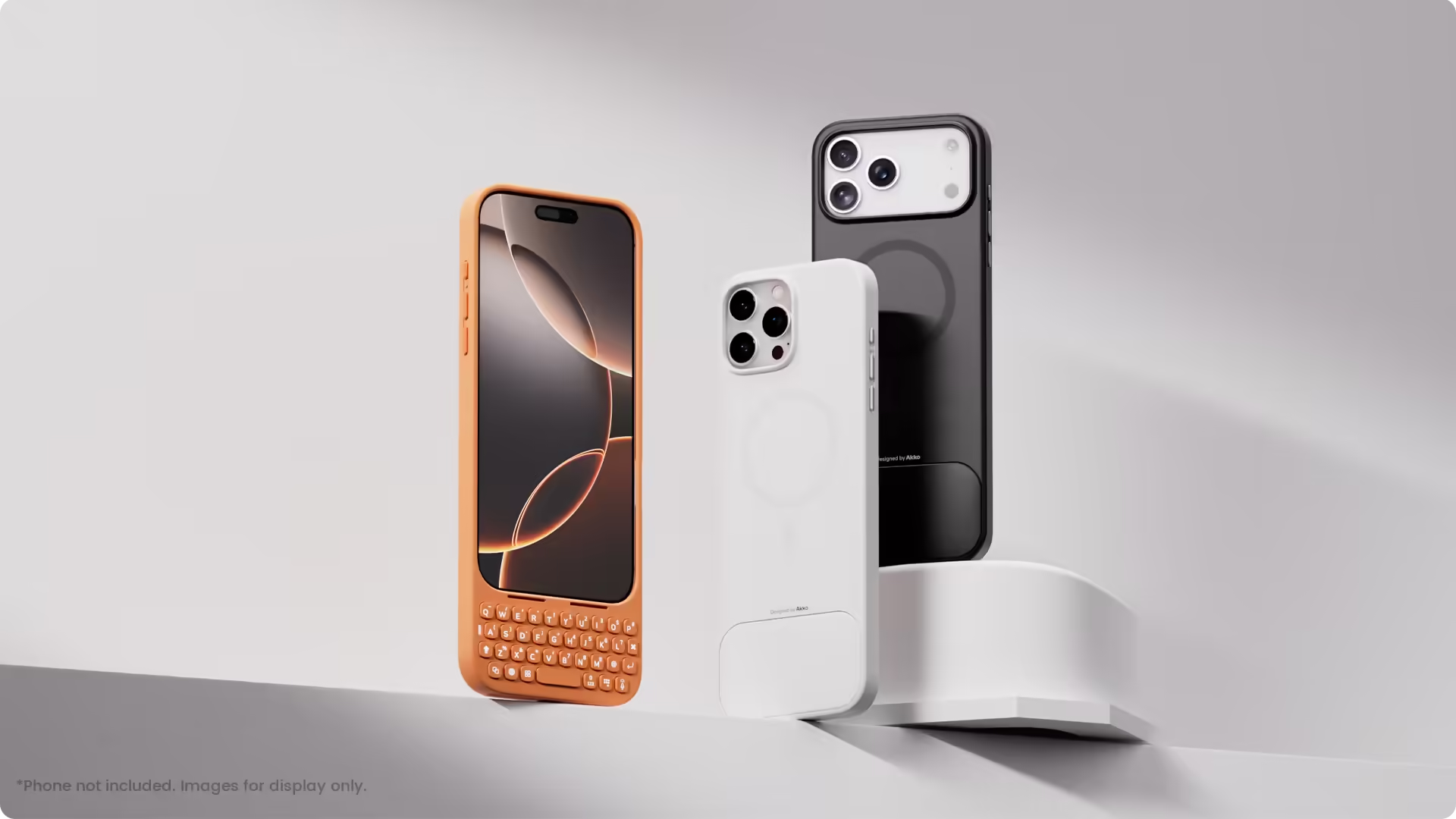
The MetaKey is a case that physically attaches a keyboard to your iPhone. It tucks in below the screen so you get both the touch interface and physical keys at once. It connects via USB-C — meaning the case and keyboard talk directly, rather than relying on Bluetooth. There’s also a passthrough USB-C port so you can charge your phone without sacrificing the keyboard.
Because keyboards add bulk and shift mass, the MetaKey addresses balance. Included is a detachable 9-gram weight you can insert into the back of the keyboard case. The aim: shift the center of gravity more naturally so it feels less top-heavy when held.
Backlighting and shortcuts
The keyboard comes with backlighting, making typing easier in dim conditions. More than just letters: there are shortcut keys for numbers, app launches, and special functions. There’s even a mode where the top two rows transform into large scrolling buttons — handy for things like switching apps or scrolling content.
Compatibility & design options
At the moment, it’s built for the iPhone 16 Pro Max and iPhone 17 Pro Max. It maintains MagSafe compatibility, so you can still attach magnets or wireless accessories. Its aesthetic includes multiple colors — black, white, orange, pink, green, blue, purple — so you can match your style.
The pricing is more modest compared to earlier keyboard-case models. For iPhone 16 Pro Max, the cost is about $69.99; for iPhone 17 Pro Max, about $59.99 (for a limited time).
Why this could matter to iPhone users
Physical keyboards fell out of favor because touchscreen tech improved, but for a certain kind of typist — people who write a lot on mobile, professionals, heavy texters — the tactile feel, the speed, the accuracy still matter. The MetaKey addresses some of the classic problems:
-
Typing speed and accuracy: Fingers can “find” keys by feel, which helps when typing without looking or glancing at autocorrections.
-
Screen visibility: With less screen space taken by an on-screen keyboard, you see more content — better reading, editing, visuals.
-
Efficiency with shortcuts: Dedicated keys, macros, and mode switches can speed up workflows.
-
Novelty & nostalgia: For users who remember the BlackBerry era fondly, this is a nod to keyboard lineage in a modern shell.
It’s not for everyone. If you do lots of full-touch navigation, voice, or swipes, it may feel cumbersome. It adds weight, bulk, and changes the way your phone is handled. But for writers, coders, email addicts, and those who type fast, it may be a sweet middle ground.
How it compares to earlier keyboard case attempts
Cases with built-in keyboards aren’t new. Over the years, various manufacturers introduced clip-on keyboards, folding keyboards, and attachable shells. Some were elegant, many weren’t. Common limitations:
-
Bluetooth lag or pairing glitches
-
Increased thickness and weight
-
Software compatibility quirks
-
Poor ergonomics or awkward hand position
The MetaKey improves on some of those by integrating the keyboard via direct USB-C, offering balance weights, and maintaining MagSafe compatibility. Its price point is also more accessible than earlier premium versions.
That said, persistent challenges remain:
-
Bulk: It will always be thicker than a simple case
-
Screen height: The keyboard pushes up the screen’s bottom edge, which may alter hand grip
-
Key travel: The typing experience will never match a full laptop
-
Battery and heat: Power draw, especially with lighting and USB passthrough, can affect battery or generate heat
Still — it’s a fresh take, not just a nostalgic gimmick.
What to watch for, and who it fits best
If you’re considering buying one, here’s what to test or evaluate:
-
Typing feel & travel: Are the keys tactile, responsive, and comfortable for long sessions?
-
Weight and balance: Insert the 9g weight and test whether your grip feels natural or off-center.
-
Battery drain & heat: Watch how battery life changes, especially with lighting on and keyboard connected.
-
App compatibility: Does using the physical keyboard break or confuse any apps, especially ones with custom inputs?
-
Port access: The USB passthrough should prevent you from losing charging capability while using the keyboard.
-
Drop / protection quality: How well does the case protect your phone in everyday drops or knocks?
If you’re a writer, a coder, someone who sends long messages or emails from your phone — this case is far more compelling. If your mobile life is light and touch-first, it might feel heavy or unnecessary.
The Akko MetaKey is more than a throwback. It’s a deliberate rethinking: can we blend iPhone elegance with the keyboard foundation that once made phones essential writing tools? It’s not perfect, it’s not for everyone — but for the right user, it could open a new way to work, message, and command from your phone.